
Infinity vs ClickUp
An honest comparison of two powerful tools, shaped by real user insight.
The Rise of All-In-One Workspaces
Over the past few years, productivity software has evolved from single-purpose tools into full “all-in-one” workspaces. Instead of juggling separate apps for tasks, notes, documentation, and collaboration, many teams now prefer a single platform that brings everything together.
In that space, ClickUp is one of the most widely discussed platforms. It’s frequently compared to tools like Notion when people evaluate modern productivity systems. But another tool that often comes up when users search for flexible alternatives is Infinity.
At first glance, ClickUp and Infinity seem to compete in the same category. Both aim to provide customizable workspaces where teams can organize tasks, manage projects, and structure information in different ways. That overlap makes them worth comparing, especially for teams deciding which type of system fits their workflow best.
However, the two tools approach productivity from slightly different angles.
ClickUp focuses on structured project execution, offering built-in task hierarchies, automation, dashboards, and workflow management.
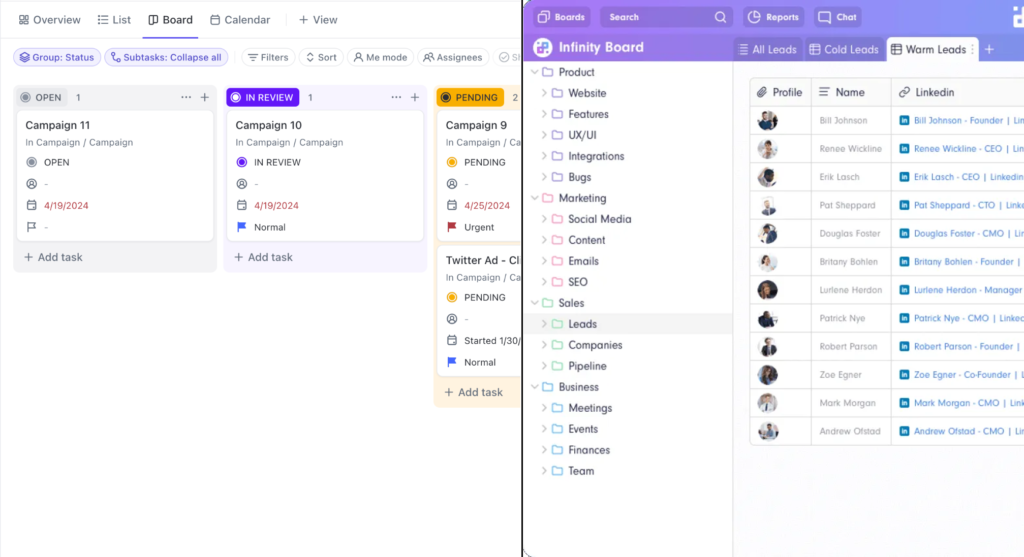
Infinity, by contrast, leans toward flexibility. Its modular system of boards, items, attributes, and views allows teams to shape the workspace around different types of workflows rather than following a predefined project management structure.
ClickUp is one of the most widely used all-in-one productivity platforms, particularly for teams that need structured project management. It combines task management, docs, dashboards, automation, and reporting in a single system designed to help teams plan, track, and deliver work.
Infinity takes a slightly different approach. Rather than focusing primarily on project execution, it provides a flexible workspace built around customizable structures such as boards, items, attributes, and views. This allows teams to organize information in many ways, from project tracking and CRM systems to content planning and internal operations.
Both tools aim to replace multiple productivity apps with a single workspace, but they differ in how structured their systems are and how teams build their workflows.
Core differences at a glance
Although ClickUp and Infinity both aim to function as all-in-one workspaces, they prioritize different aspects of productivity. ClickUp is built primarily for structured project management, with task hierarchies, automation, dashboards, and reporting tools designed to help teams plan, track, and deliver work efficiently.
Infinity, by contrast, focuses more on flexibility. Its system of boards, items, attributes, and multiple views allows teams to organize information in different ways, whether that’s project tracking, CRM pipelines, content calendars, or internal databases.
In practical terms, the difference comes down to structure versus flexibility. ClickUp provides more built-in tools for managing projects and coordinating teams, while Infinity gives users more freedom to shape the workspace around their own workflows.
Featured Videos
Get a feel for the UI of Notion and Click-Up
Disclaimer: Both of these video are featured from youtube and have not been produced by Productivity Fuel. To see more from these channels, click the icon on the top left of each video.
Pros of Infinity

Highly customizable
Boards, items, attributes, and views let teams structure work in many ways.Multiple views
Switch between table, board, calendar, and list depending on your workflow.Flexible custom fields
Attributes make it easy to organize, filter, and track data.Balanced structure
Provides a clear framework while still allowing customization.One-time pricing option
Lifetime plans can be appealing for individuals and small teams.
Pros of Click-Up
1. Strong project management tools
Includes dashboards, workload views, recurring tasks, goals, time tracking, and automation — ready to use.
2. Great visibility for managers
It’s easier to see who’s doing what and track progress across teams.
3. Built-in automation
You can automate tasks and workflows without needing extra tools.
4. More structure from the start
You don’t have to build everything from scratch.
5. Often better value for mid-sized teams
Pricing can be competitive for the amount of features included.
Cons of Infinity

Smaller ecosystem
Fewer integrations, templates, and third-party tools.Fewer advanced PM features
Limited automation, reporting, and workload management.Data-heavy interface
Can feel more like a spreadsheet than a workspace.Initial setup required
Teams still need to design boards and attributes.
Cons of Click-Up
1. Can feel overwhelming
There are a lot of features. New users may feel overloaded.
2. Interface can feel busy
Compared to Notion, it’s more operational and less minimalist.
3. Not as strong for deep documentation
It has docs, but it’s not as elegant for long-form knowledge management.
4. Customization can become complex
With great flexibility comes configuration effort.
What Reddit users say

“ClickUp can feel limited by its task-first structure.”
Some users point out that while ClickUp is powerful, everything in the system ultimately revolves around tasks. One commenter explains that this makes it harder to represent other types of data like people, documents, or entities that don’t naturally fit into a task structure. For users trying to build more database-like systems, this can feel restrictive.
“ClickUp is flexible, but not truly unlimited.”
One user described ClickUp as “just flexible enough to express most of what I need.” They praised the platform’s interface and how well it handles large amounts of information. At the same time, they note that the flexibility still operates within predefined structures, which may not work for people who want total control over how their data is organized.
“Infinity looks similar to ClickUp, but faster.”
When discussing alternatives, one user mentioned that Infinity appears very similar to ClickUp but with a faster interface. This suggests that some people exploring alternatives are attracted to tools that maintain similar flexibility while feeling lighter and more responsive.
“I felt that ClickUp lacked some flexibility.”
The overall tone of the discussion shows that users looking beyond ClickUp often want systems that behave more like databases than task managers. They want the ability to structure information freely rather than fitting everything into predefined project management workflows.
Conclusion
Which is best for you?
Who Are you?
Infinity or
Click-Up?
Why?
Creative Freelancer
eg. designers, writers, video editors
Infinity
Flexible boards and attributes work well for content pipelines, ideas, and client projects without heavy PM overhead.
Technical Freelancer
eg. developers, product consultants
Click Up
Strong task structure, milestones, sprint-style workflows, and clearer deliverable tracking.
Marketing / Campaign Freelancer
Depends on complexity
Light content planning → Notion. Heavy deadline & campaign tracking → ClickUp.
Student
Infinity
Simpler, lighter system for tracking assignments, notes, and projects. ClickUp is usually overkill.
Solo or Duo Business
(1 – 3 people)
Infinity
Easier to set up flexible systems for CRM, projects, and planning without complex workflows.
Small to large Business
(4+ people)
Click Up
Better for delegation, tracking work, and keeping everyone accountable.
The right one for you
Pricing
Infinity
Click Up
Basic Plan (annual)
$216 (3 users)
Free
Plus (annual)
$324 (3 users)
$84
Business (annual)
$1,344
$144
Enterprise
Contact Sales
Contact Sales
Both ClickUp and Infinity are available globally and offer pricing in multiple major currencies. Please note that pricing may vary by region and is subject to change. For the most up-to-date plan details and current pricing, refer to the official links below.
What We recommend
Infinity and ClickUp both aim to be all-in-one workspaces, but they suit different types of work. Infinity works well for individuals and small teams that want a flexible system to organize projects, clients, or content using customizable boards, items, and attributes. It’s adaptable and relatively simple to structure around your workflow. However, its pricing can feel higher than expected because plans are typically sold with a minimum of three seats. Even if you are a solo user, you are effectively paying for three licenses, which increases the real cost for individuals.
ClickUp, by contrast, is designed for structured project management. It includes advanced task hierarchies, dashboards, automations, and reporting that help teams manage complex workflows and collaborate at scale. It also offers a free plan and true per-user pricing, making it more affordable for solo users or very small teams. In general, choose Infinity if you prefer a flexible workspace and already have a small team, and ClickUp if you need scalable project management or want a cheaper option when working alone.